XML & JSON Downloads
To facilitate robust auditing and system integration, the "Download Report" menu now includes options for XML and JSON formats. These files capture the complete e-invoice dataset, including the official LHDN validation response. For bulk XML requests, the system automatically packages individual invoice files into a compressed ZIP archive, ensuring efficient retrieval of raw compliance data.
.png)
2. Enhanced Ingestion Field Validation
To ensure high data integrity and strict adherence to the latest schema requirements, the ingestion validation rules have been tightened effective January 9, 2026. Date fields now strictly require the YYYY-MM-DD format (values like "N/A" are no longer accepted). Additionally, stricter character limits and code standardizations have been applied to fields such as Supplier Bank Account, Incoterms, and MSIC descriptions to prevent downstream submission rejections.SDK update details - https://sdk.myinvois.hasil.gov.my/sdk-1-0-release/
Bug Fix
3. Multi-Tax & Print Alignment
The Detailed CSV report logic has been fixed to correctly process line items containing multiple tax rates. Additionally, the print rendering engine has been updated to accurately reflect multi-line item changes. This ensures that complex tax structures are now consistent across both offline CSV exports and PDF printouts.
1. High-Value Consolidation Restriction
To ensure compliance with the latest IRBM mandate (effective Jan 1, 2026), the system now restricts the consolidation of invoices exceeding RM 10,000. These high-value transactions are automatically excluded from consolidation batches and must be generated individually with full buyer details. To assist with this workflow, a new "Amount > 10k RM" filter and in-context alerts have been introduced, enabling you to proactively identify, validate, and submit these invoices within the required timeline.
.png)
2. Customizable Auto-Email Rules
To provide flexible management of invoice communications, the auto-email trigger is no longer a global "all-or-nothing" setting. You can now configure automatic email delivery at the individual TIN or Branch level. Furthermore, you can restrict triggers to specific document types (e.g., Sales vs. Purchase). This allows you to tailor the platform's behavior to fit complex entity structures, ensuring emails are sent only when and where required.
.png)
3. Unique Line Item IDs
To ensure data integrity and prevent downstream processing errors, the API ingestion validation has been strengthened. The system now enforces strict uniqueness for Line Item IDs within a single invoice. Duplicate line IDs are no longer accepted during ingestion. This proactive validation eliminates data conflicts that previously caused failures when attempting to use the "Edit" functionality on API-generated documents.
4. Source type for Get Documents API
To streamline integration and reconciliation, the "Get Documents API" for purchase invoices now includes a source type field in the response. This update allows your systems to automatically distinguish between invoices auto-fetched from LHDN and standard purchase documents. By identifying the exact origin, you can streamline ERP updates and ensure accurate reconciliation of government-sourced data.
1. Unified Currency MIS Dashboard
The MIS Dashboard within the "Reports" section is now fully active. Leveraging the mandatory currency exchange rate, the system automatically converts and aggregates all financial data into MYR. This enhancement provides a comprehensive, consolidated view of your total business performance—covering ingested, validated, and processed invoice values—in a single, unified currency, regardless of the original transaction currency.
.png)
2. Consolidated Document Number in Reports
To facilitate easier tracking of invoices, the downloadable detailed report (CSV) now includes the "Consolidated Document Number" column. This update aligns your offline records with the application UI, allowing you to easily map individual transactions back to their specific consolidated submission without manual lookups or cross-referencing.
3. Smart Recon Auto-Fill
To expedite your reconciliation workflows, the "Re-run" function has been optimized to automatically recall your previous settings. The system now pre-fills the Business and Date Range fields based on the prior execution logic. This enhancement eliminates repetitive manual selection, allowing you to re-initiate reconciliation tasks instantly and with greater consistency.
.png)
4. Self-Billed Deletion with Filters
To streamline your document management workflows, the deletion logic for self-billed invoices has been improved. You can now successfully delete self-billed documents even when specific search filters (such as "E-Invoice Type") are active. This fix eliminates the previous requirement to clear filters before deleting, ensuring a faster and more fluid cleanup process.
5. Strict Historical Consolidation Validation
To ensure strict adherence to LHDN submission timelines, the consolidation validation logic has been enhanced to evaluate the document year in addition to the month. This update now prevents the consolidation of invoices from previous years (e.g., attempting to process prior-year data that matches the current calendar month), ensuring that all consolidations are restricted to the valid, current compliance window.
Bug Fixes
1. Enhanced Reconciliation Mismatch Logic
To improve the accuracy of your reconciliation reports, the logic for handling documents with multiple data discrepancies has been upgraded. Previously, documents containing simultaneous errors (e.g., both Buyer TIN and Doc Date mismatches) were incorrectly categorized as "Missing." The system now correctly identifies and classifies these documents under a unified "Mismatch" category. Additionally, sub-buckets within the Mismatch category have been removed to simplify the view. This update ensures precise error reporting, allowing you to clearly see and resolve specific data conflicts without digging through inaccurate "Missing" lists.
.png)
1. Enhanced TIN Validation
2. Dedicated LHDN API Credentials
To enhance platform stability and eliminate LHDN rate-limit failures, a new "API Credentials" section is now available under "Global settings." This update allows for the configuration of dedicated LHDN Client IDs and Client Secrets. When active, the system automatically uses these credentials for e-invoice submissions, providing a dedicated LHDN transaction quota. This change isolates high-volume submissions, prevents system-wide service disruptions from shared rate limits, and ensures higher processing reliability.

3. Streamlined Auto-Fetch Configuration
As part of the credential management update, the "Auto-Fetch Purchase Invoices" feature has been streamlined. The separate configuration for auto-fetch (including Client ID and Secret fields) has been removed. This feature is now directly linked to the new "API Credentials" section. To enable auto-fetch for a TIN, the corresponding LHDN credentials must first be added and activated on the "API Credentials" page. This centralizes credential management and ensures a valid connection is present for fetching invoices.

4. B2C Invoice Correction Workflow
.png)
5. Cancellation Reason in Reports
To improve auditability and tracking, the system has been updated to include the captured cancellation reason in downloadable reports. A new "Cancellation Reason" column has been added to e-invoice reports. This enhancement provides access to why an invoice was cancelled, closing a previous information gap and allowing for better record-keeping without needing to search for the original request.
.png)
6. Line Item Multi-Tax Support
To align with LHDN regulations that permit multiple taxes on a single item (e.g., sales tax and tourism tax), the platform now fully supports multi-tax line items. This enhancement is reflected across the product:
1. Mandatory Currency Exchange Rate
2. Exchange Rate for Consolidated Invoices
3. "Buyer Email" Field in B2C portal

4. Contextual Help Update
To improve usability, informational tooltips providing contextual help have been added to the Customer Portal and will appear on hover.
5. 2-Month Window for Self-Billed E-invoices
6. Download Access for View-Only Users
7. State Code List Update
Reconciliation Related Updates
.png)
.png)
.png)
.png)
Duplicate Submission Error Handling: To handle duplicate submissions to LHDN , we've added a syncing mechanism using the original UUID, ensuring smoother operations and better error handling.
New Columns Added to the Summary Screen: We’ve added these columns to help you get a clearer view of your invoices:

Date Range for Reconciliation Run: We’ve extended the date range from 1 month to 60 days, giving you more flexibility when running recon reports.
Introducing Workspace Authentication Settings, which gives workspace admins greater control over login methods for their users. This helps strengthen security and lets organizations enforce preferred authentication policies more effectively.
Key Features:
- Added a validation for verification of the phone number
- Errors encountered at LHDN for e-invoice generation are now included in the error report
- Improvement in the consolidation algorithm to bifurcate allowance charge and discounts
- Master codes update from LHDN -
- Consolidation is now allowed for failed and invalid invoices
- Fixed the email template editing issue on the product UI
- UX improvements in reconciliation
- Fixes to avoid print template mapping issues in auto-email trigger
E-invoicing
Search Taxpayer TIN (on UI)
.png)
Reconciliation at Branch level
.png)
Improvements
.png)
We are excited to announce the latest release for the ClearTax e-invoicing portal in Malaysia. This update includes several new features and enhancements designed to improve your e-invoicing experience and ensure maximum compliance with LHDN regulations.
What’s New in the March Update Release?
These new features to our portal further automate the e-invoicing process, helping to reduce both time and errors when generating e-invoices.
Support Helpdesk in Product to Raise Tickets
Users can now directly raise support tickets and track the status of their previous tickets. You can also add files and screenshots for reference when raising tickets.
.jpg)
Auto-Fetch Purchase Invoices from LHDN
Simply store your client ID and client secret keys from MyInvois in the ClearTax product, and purchase invoices generated against your TIN will be fetched and synced automatically.
.jpg)
Search Taxpayer API
This API has been introduced to search taxpayer TIN based on taxpayer details like name, ID type, and ID value. This feature will help users verify TIN details, set up customer masters in ERPs, and reduce TIN-related errors.
Other Product Enhancements
Note: Release notes for all product updates and new features can now be accessed from the product homepage by clicking the “Product Release Notes” card.
E-Invoicing
Changes in consolidation logic
The consolidation algorithm has been updated in line with LHDN guidelines, as now the relaxed guidelines for phase 1 customer is ending on 31st Jan’25
.png)
Support for E-invoice version 1.1
Landing page for reconciliation
.png)
Enhancements:
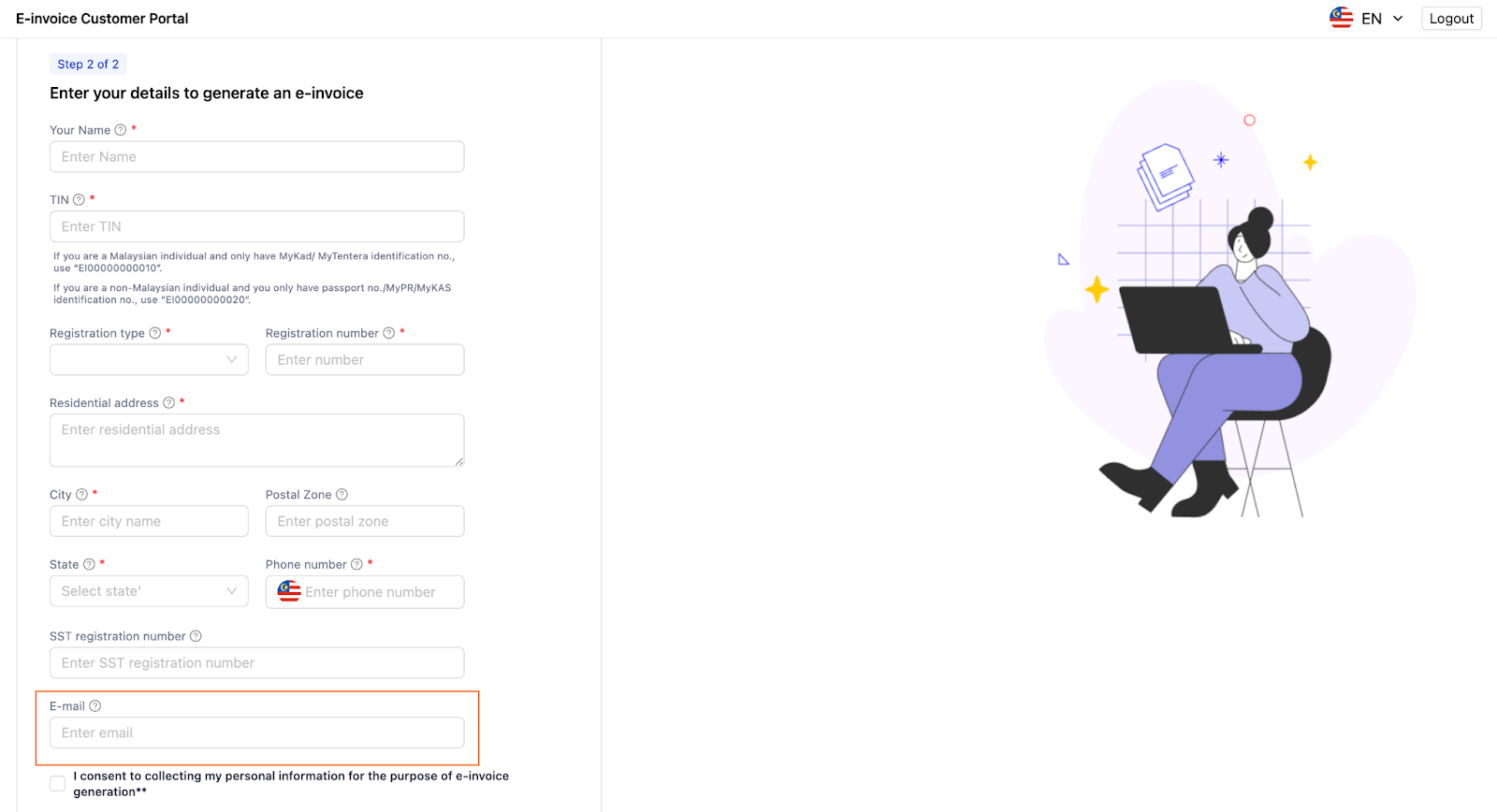
Enhancements on the B2C customer portal:
.png)
We are pleased to announce that the major updates and enhancements to the ClearTax e-Invoicing portal are now live.
These updates are designed to streamline your e-invoicing operations further, enhance functionality, and improve user experience.
New Features & Enhancements
Product Health Status Page
The new Product Health Status page allows you to track API performance and monitor the health of government infrastructure (LHDN) in real-time. You can also subscribe to email alerts whenever performance degrades.
.png)
Alerts & Communication Settings
You can now customize TINs and email recipients for a variety of alerts and reports directly in the “Alerts & Communication” settings. This helps to ensure alerts reach the right stakeholders in your organization.
.png)
Email API
Automatically send invoice PDFs directly to users from your existing systems for faster and more efficient communication.
Other Enhancements
We are excited to share the latest updates and enhancements that went live in December on the ClearTax e-Invoicing portal. These new features streamline invoicing processes, improve user experience, and provide more comprehensive reporting capabilities.
New Features of ClearTax E-Invoicing Portal
Feature/Enhancement
Description
Sales Reconciliation for B2C
Reconciliation of B2C sale e-invoices with the Sales Register, ensuring accurate record-keeping.
Send Email to Multiple Recipients
Pass multiple email addresses (comma-separated) to generate and send e-invoices via automated email triggers, making it easier to send to multiple recipients.
Delete Invalid and Failed Invoices
Easily removing invoices in a failed or invalid state, simplifying invoice management.
Invoice Loader on Documents Screen
Improved user experience when scrolling to the end of the page on the documents screen, ensuring smoother navigation.
Consolidated Invoices Details in MIS Dashboard
Added consolidated invoice details to the summary cards in the MIS dashboard for a more comprehensive overview of your invoicing data.
These updates are designed to make your invoicing process more efficient, accurate, and user-friendly. We encourage you to explore the new features and leverage them to optimize your invoicing workflows.
We are glad to announce that we have updated several new features for the ClearTax e-Invoicing Portal. These updates are aimed at streamlining your e-invoicing process, improving accuracy, and compliance with e-invoicing rules.
Below is a detailed overview of each new feature, along with its potential impact on your business and use cases.
1. Fetch Purchase Documents
Users can now fetch all purchase invoices via the LHDN portal.
This specific feature simplifies procurement reporting, ensuring that all purchase transactions are extracted in one go. Businesses can cross-verify their supplier ledger with purchases in real time.
2. Rejection of Purchase Invoices
Users can now reject purchase e-invoices directly from the ClearTax portal, without the need to log into the MyInvois Portal.
This improves workflow efficiency by enabling faster rejection of incorrect or invalid invoices. For example, finance teams can immediately reject erroneous invoices, preventing payments for incorrect goods or services without having to login to MyInvois Portal
3. Document Audit Trail
An audit trail is now available for tracking submitted and received documents with a timestamp.
Businesses can now have complete visibility into the lifecycle of e-invoices, ensuring full transparency. Businesses can easily track modifications or validations in their invoices, reducing risks during internal or external audits.
4. Cancellation of Consolidated Invoices
Consolidated e-invoices can now be canceled from the ClearTax portal.
Businesses dealing in B2C transactions or those under LHDN’s six-month grace period can now cancel invoices in bulk. It's a valuable tool for businesses handling high transaction volumes, ensuring quick and efficient corrections reducing risk of non compliance.
5. Re-generation of canceled E-Invoices
Resubmit canceled (if needed) e-invoices for B2B, self-billed, and B2C transactions
Previously, if you cancel an invoice, you'd have to generate a brand-new e-invoice to resubmit it. But now, with our latest update, you can submit canceled e-invoices for B2B, self-billed, and B2C transactions without needing to create a new one.
6. Updating Status for Canceled Documents
A sync feature now updates the status of invoices on the MyInvois portal with ClearTax database, ensuring real-time updates on the ClearTax dashboard.
This feature ensures real-time synchronization, preventing mismatches between ClearTax and LHDN. Businesses can maintain up-to-date records, ensuring all cancellations are reflected accurately, reducing errors in reporting.
7. CSV Report
The CSV reports have been revamped to include and omit certain fields, with changes to the sequencing for better alignment with reporting needs.
The improved reporting provides granular visibility into e-invoicing data, helping businesses analyze patterns and transaction details more effectively.
8. Fetching of Invoices Based on Additional Custom Fields
Invoices can now be retrieved using additional custom fields from the B2C customer portal.
This feature allows businesses to customize invoice retrieval based on specific transaction criteria, improving tracking and management of particular transactions like promotions or refunds.
9. SFTP Email Report
Automatically sends detailed activity reports to customers via SFTP.
Allowing businesses to track their invoicing performance and activities efficiently without manual intervention ensuring improved compliance and operational oversight.
.png)
Enhanced Print Templates for a Smoother Invoicing Experience
We’ve made some updates to our print templates to make your invoicing process even easier:
New Templates- We’ve added new options to cover more of your needs:
- Export Invoices for export transactions.
- B2C Invoices for business-to-consumer transactions.
A Government Format template that aligns with the MyInvois portal guidelines.
Easier to Find What You Need- We’ve renamed the templates so it’s simpler to pick the right one:
i. Standard EInvoice Template (ID: 1)
ii. ClearTax Export Template (ID: 6)
iii. ClearTax EInvoice Template (ID: 8)
iv. Govt EInvoice Template (ID: 9)
v. ClearTax B2C EInvoice Template (ID: 33)
Template Previews & Helpful Descriptions:
Now, you can preview each template before using it, and we’ve added descriptions for things like country codes, tax types, and units of measurement to make everything clearer.
Cleaner Layout & Better Formatting:
We’ve tidied up the alignment and hidden unnecessary fields to improve the overall look of your invoices.
Currency Formatting: The currency symbol has been removed from all amounts, and values are now shown in the invoice’s currency code for greater clarity.These changes only apply to our standard print templates. Any custom templates you have remain unchanged.

You can now delete Failed documents directly through the ClearTax portal or via our API:
We’ve made some tweaks to the homepage tiles to help you track documents more effortlessly. Now, you’ll be able to see document numbers for Sales and Purchase documents with a "Consolidated" status—offering clearer insights at a glance.

We’re confident these updates will make your invoicing smoother and more efficient, giving you more control and clarity in managing your documents. As always, we're continuously working to improve your experience and would love to hear your feedback on these changes.
ClearTax e-invoicing portal that allows businesses to generate consolidated e-invoices for B2B and B2C sales documents, as well as self-billed purchases.As per the latest guidelines shared by LHDN on 30th July, LHDN has granted relaxation in the way businesses are allowed to consolidate their documents instead of reporting each document separately during the interim relaxation period (6 months).To meet LHDN compliance standards, businesses can use the ClearTax portal to consolidate their sales and self-billed purchase documents.Steps to Use ClearTax for Consolidated e-InvoicingTo generate consolidated e-Invoices on the ClearTax portal, follow these steps:
1. Upload Your Documents: Consolidation can be done for B2B and B2C sales and self-billed purchase documents. First, ensure all your documents are uploaded to the ClearTax portal. You can upload your data in two ways:
2. Select Documents for Consolidation: Consolidation can be performed for any document type supported by LHDN (e.g., Invoice, Credit Note) for a given calendar month. However, please note:
3. Generate Consolidated e-Invoices:
We have observed that for certain transactions users get the error message “maximum allowed document line length 2000 exceeded” or “maximum allowed document size 300 KB exceeded” while generating e-Invoice.
What is this error?
LHDN allows document size less than 300 kb in a request to generate e-invoice, however in cases where a single invoice has a huge number of line items this payload size is breached and LHDN gives an error message - “Invalid structured submission, Maximum allowed document line length 2000 exceeded.” or “Invalid structured submission. Maximum allowed document size 300 KB exceeded”, even after minification of payload is done.
Based on our observation, when an individual document has between 50-75 line items then size of payload as per LHDN data schema increases to more than 300 Kb and we start getting this error from LHDN side, when we send the payload for e-Invoice generation.
In certain cases, we have observed, higher numbers of line items also get accepted when the amount of details in a document is minimal.
How to resolve this error?
In case when a single invoice has a huge number of line items or when you are receiving the above-mentioned error message, LHDN has recommended that you split the invoice into multiple smaller invoices of lesser line items so that document size is less than 300 Kb and try to generate e-invoice for the individual smaller invoices.
How to split the invoice?
Please note, these are some of potential solutions and there may be other ways to handle splitting of invoices that you may explore. We suggest you discuss internally and choose the right method as per your business needs. We will keep you informed in case there is any change in specification by LHDN regarding this.
We understand that navigating the e-invoicing process can sometimes raise questions. To assist you further, we've compiled a comprehensive list of Frequently Asked Questions (FAQs) tailored specifically for you.
Check out our FAQ page where you’ll find answers to common questions like:
Access the FAQ Page Here
Whether you're new to our platform or have been using it for a while, this resource is designed to make your experience as seamless as possible. If your question isn’t covered, our Customer Success Team is always ready to provide personalized support.
Did you know that you can choose between Malaysia Time (MYT) and Universal Time Coordinated (UTC) as your preferred time zone for processing and viewing your e-invoices on the ClearTax Web Portal?Default Setting: UTCClearTax processes and displays your data by default in Universal Time Coordinated (UTC) as LHDN expects the timezone to be in UTC. Any e-invoicing payload you send to ClearTax is managed using UTC, and you'll see this time zone reflected in your Import History, Document Details Page, Print, and Reports.Changing the Time Zone to MYT You have the option to switch the time zone setting to Malaysia Time (MYT). By making this simple change, ClearTax will process all date and time data according to MYT, and you'll see MYT displayed across all e-invoices and relevant queries.Steps to Change the Time Zone to MYT
Go to Settings >
Time Zone inside the ClearTax web portal.Select MYT as your preferred timezone.
Choosing the most suitable time zone for your e-invoicing is important to ensure that your transactions are accurately recorded and reported in alignment with your business hours. Ensuring your business convenience is our utmost priority.
We understand how crucial it is to ensure your e-invoicing process runs smoothly. That's why we are excited to share our Error Resolution Guide – a step-by-step resource designed to help you quickly troubleshoot and resolve common e-invoicing errors.
Explore the guide here: Error Resolution Guide.
Stay ahead of the e-invoicing compliance curve with our Comprehensive E-Invoicing Guide for Malaysia. This essential resource covers everything you need to know for smooth and compliant implementation under the latest LHDN regulations.
Explore the guide here: E-Invoicing Guide for Malaysia.
To streamline your e-invoicing process, use ClearTax’s Excel ingestion method. Simply download the LHDN-compliant Excel template, fill in the necessary details such as seller and buyer information, invoice amounts, and tax details. Once completed, log into the ClearTax portal, upload your filled Excel sheet, and validate the data. Upon successful validation, you can quickly generate your e-invoices and even print them with QR codes for easy compliance.
1. Bank Details Print Fix
The issue preventing bank account numbers from appearing on printed PDF templates has been resolved. By correcting the underlying field mappings, the system now successfully passes the required data to the document generator. Bank details will now render accurately on all exported invoices, ensuring complete payment instructions are visible on the final documents.
2. Bulk Consolidation Resiliency
Invoice consolidation logic has been updated to prevent batch failures caused by incomplete data. The system now gracefully handles invoices with empty allowance/charge fields or zero-value foreign currency amounts, ensuring these edge cases no longer disrupt the broader consolidation workflow.
3. UUID Document Retrieval Fix
An issue causing the "Get Document via UUID" request to fail for consolidated documents has been resolved. The underlying synchronization logic was optimized to eliminate redundant sync actions, ensuring fast and reliable document retrieval.